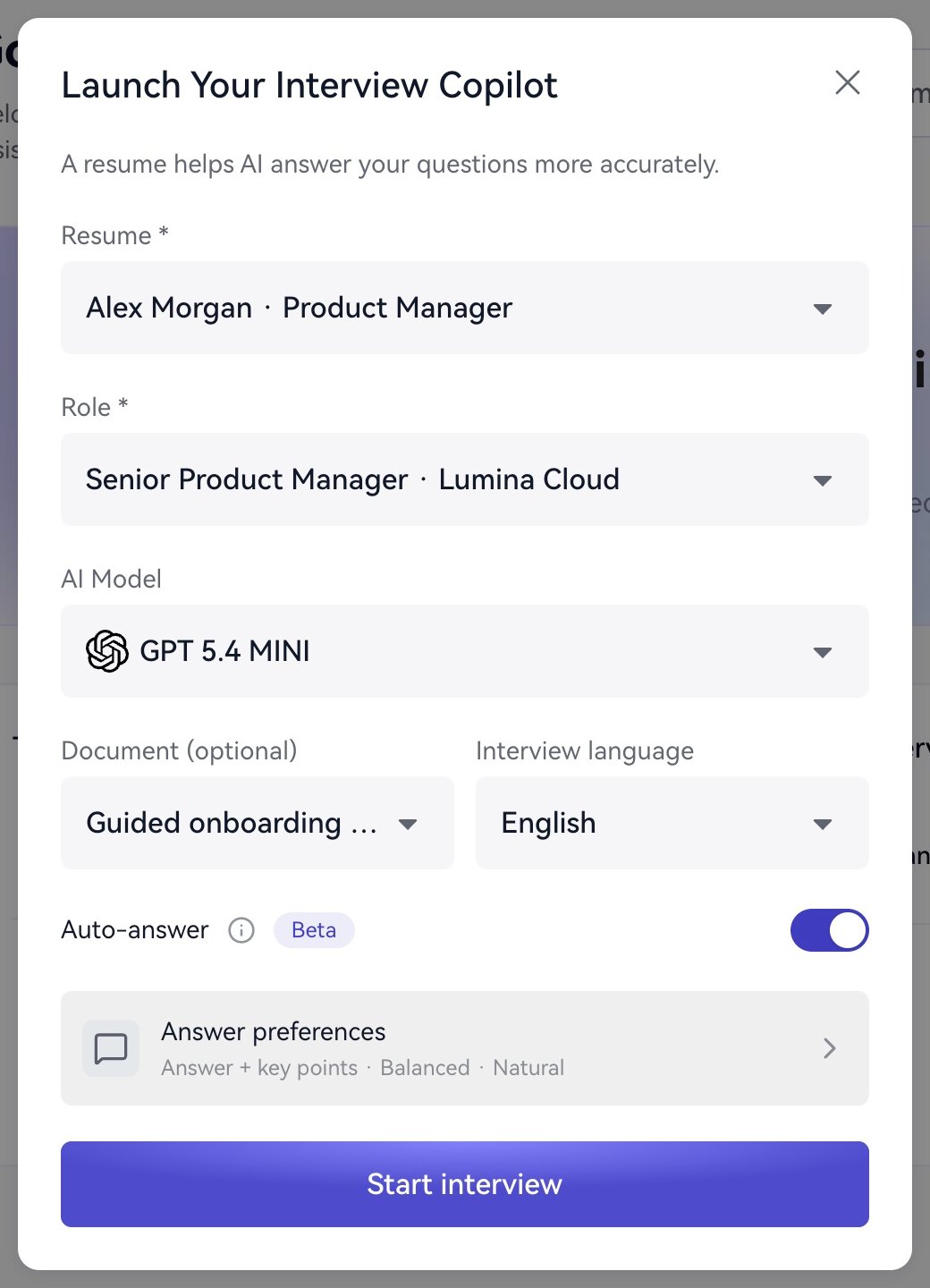
Start with familiar materials and Answer + key points / Balanced / Natural. Try a specific text question to learn the answer area.To control timing yourself, turn off automatic answering before launch, then use AI Answer or Chat in the session.
Check the displayed materials and preferences before each launch. Update workspace materials when your interview focus changes. Finish with Interview duration → End Interview.Next: Models and language, Answer preferences, or Assistant overview.
{"docsConfig":{"theme":"mint","$schema":"https://mintlify.com/docs.json","name":"Great Offer AI","description":"Learn how to prepare interview materials, configure your real-time copilot, get answers, and review interview reports with Great Offer AI.","colors":{"primary":"#3F3CBF","light":"#4240C1","dark":"#7A85FF"},"logo":{"light":"https://mintcdn.com/great-offer-ai/RzGfMPEMzSG8wtC3/logo/light.svg?fit=max\u0026auto=format\u0026n=RzGfMPEMzSG8wtC3\u0026q=85\u0026s=b5e7a47f6ac31db54e8c3f0b86f1cff3","dark":"https://mintcdn.com/great-offer-ai/RzGfMPEMzSG8wtC3/logo/dark.svg?fit=max\u0026auto=format\u0026n=RzGfMPEMzSG8wtC3\u0026q=85\u0026s=78193bac940226b493cc7c164b46de31"},"favicon":"https://mintcdn.com/great-offer-ai/RzGfMPEMzSG8wtC3/favicon.png?fit=max\u0026auto=format\u0026n=RzGfMPEMzSG8wtC3\u0026q=85\u0026s=2683d5b6975732e3e61f7c50f37fd75c","navbar":{"links":[{"href":"/faq","label":"常见问题"},{"href":"mailto:support@greatoffer.ai","label":"联系支持"}],"primary":{"type":"button","label":"访问官网","href":"https://greatoffer.ai/"}},"contextual":{"options":["copy","view","chatgpt","claude","perplexity","mcp","cursor","vscode"],"display":"header"},"styling":{"latex":false},"navigation":{"languages":[{"language":"en","default":true,"navbar":{"links":[{"href":"/en/faq","label":"FAQ"},{"href":"mailto:support@greatoffer.ai","label":"Contact support"}],"primary":{"type":"button","label":"Visit website","href":"https://greatoffer.ai/"}},"href":"en"},{"language":"es","navbar":{"links":[{"href":"/es/faq","label":"Preguntas frecuentes"},{"href":"mailto:support@greatoffer.ai","label":"Soporte"}],"primary":{"type":"button","label":"Visitar la web","href":"https://greatoffer.ai/"}},"href":"es"},{"language":"fr","navbar":{"links":[{"href":"/fr/faq","label":"FAQ"},{"href":"mailto:support@greatoffer.ai","label":"Assistance"}],"primary":{"type":"button","label":"Voir le site","href":"https://greatoffer.ai/"}},"href":"fr"},{"language":"jp","navbar":{"links":[{"href":"/jp/faq","label":"よくある質問"},{"href":"mailto:support@greatoffer.ai","label":"サポート"}],"primary":{"type":"button","label":"公式サイト","href":"https://greatoffer.ai/"}},"href":"jp"},{"language":"ko","navbar":{"links":[{"href":"/ko/faq","label":"자주 묻는 질문"},{"href":"mailto:support@greatoffer.ai","label":"지원 문의"}],"primary":{"type":"button","label":"웹사이트","href":"https://greatoffer.ai/"}},"href":"ko"},{"language":"cn","href":"cn"}]}},"deployment":{"deploymentMetadataValue":{"subdomain":"great-offer-ai","hasAudioNarration":false,"actualSubdomain":"great-offer-ai","customDomains":[],"gitSource":{"type":"github","owner":"eosarc","repo":"great-offer-docs","deployBranch":"main","contentDirectory":"","isPrivate":true,"mountPath":"","label":"","_id":"6aead949aa8ca227fbc87c06"},"entitlements":{"AI_CHAT":{"status":"ENABLED"},"WEB_MCP":{"status":"ENABLED"},"NARRATION":{"status":"ENABLED"}},"buildId":"6aed8de73c75956dbd00e28f","clientVersion":"0.0.4111","searchFilterCounts":[{"language":"cn","tag":"使用实时助手","count":7},{"language":"en","tag":"Use the live assistant","count":7},{"language":"es","tag":"Asistente en tiempo real","count":7},{"language":"fr","tag":"Assistant en temps réel","count":7},{"language":"jp","tag":"リアルタイムアシスタント","count":7},{"language":"ko","tag":"실시간 어시스턴트","count":7},{"language":"cn","tag":"快速开始","count":4},{"language":"cn","tag":"面试准备","count":4},{"language":"cn","tag":"面试复盘","count":4},{"language":"en","tag":"Getting started","count":4},{"language":"en","tag":"Prepare for interviews","count":4},{"language":"en","tag":"Review interviews","count":4},{"language":"es","tag":"Primeros pasos","count":4},{"language":"es","tag":"Preparar entrevistas","count":4},{"language":"es","tag":"Revisar entrevistas","count":4},{"language":"fr","tag":"Premiers pas","count":4},{"language":"fr","tag":"Préparer les entretiens","count":4},{"language":"fr","tag":"Analyser les entretiens","count":4},{"language":"jp","tag":"はじめに","count":4},{"language":"jp","tag":"面接の準備","count":4},{"language":"jp","tag":"面接の振り返り","count":4},{"language":"ko","tag":"시작하기","count":4},{"language":"ko","tag":"면접 준비","count":4},{"language":"ko","tag":"면접 복기","count":4},{"language":"cn","tag":"账户与额度","count":3},{"language":"cn","tag":"启动与回答设置","count":3},{"language":"cn","tag":"隐私与支持","count":3},{"language":"en","tag":"Account and access","count":3},{"language":"en","tag":"Launch and answer settings","count":3},{"language":"en","tag":"Privacy and support","count":3},{"language":"es","tag":"Cuenta y acceso","count":3},{"language":"es","tag":"Inicio y respuestas","count":3},{"language":"es","tag":"Privacidad y soporte","count":3},{"language":"fr","tag":"Compte et accès","count":3},{"language":"fr","tag":"Lancement et réponses","count":3},{"language":"fr","tag":"Confidentialité et assistance","count":3},{"language":"jp","tag":"アカウントと利用枠","count":3},{"language":"jp","tag":"起動と回答設定","count":3},{"language":"jp","tag":"プライバシーとサポート","count":3},{"language":"ko","tag":"계정과 이용 권한","count":3},{"language":"ko","tag":"시작 및 답변 설정","count":3},{"language":"ko","tag":"개인정보와 지원","count":3},{"language":"cn","tag":"应用设置","count":2},{"language":"en","tag":"App settings","count":2},{"language":"es","tag":"Ajustes de la aplicación","count":2},{"language":"fr","tag":"Paramètres","count":2},{"language":"jp","tag":"アプリ設定","count":2},{"language":"ko","tag":"앱 설정","count":2},{"language":"cn","tag":"欢迎","count":1},{"language":"cn","tag":"快速解答","count":1},{"language":"en","tag":"Quick answers","count":1},{"language":"en","tag":"Welcome","count":1},{"language":"es","tag":"Respuestas rápidas","count":1},{"language":"es","tag":"Bienvenida","count":1},{"language":"fr","tag":"Réponses rapides","count":1},{"language":"fr","tag":"Bienvenue","count":1},{"language":"jp","tag":"よくある質問","count":1},{"language":"jp","tag":"ようこそ","count":1},{"language":"ko","tag":"자주 묻는 질문","count":1},{"language":"ko","tag":"환영합니다","count":1}]},"assistantConfig":{"enableAskAiButton":false,"enableStarterQuestions":false,"enableContextualStarterQuestions":false,"enableAskAiSearchBar":true},"basePath":"","hasChatPermissions":false,"hasWebMcpPermissions":true,"toggles":[{"name":"kill-isr","enabled":true,"variant":{"name":"disabled","enabled":false,"feature_enabled":true},"impressionData":false},{"name":"custom-rbac-roles","enabled":true,"variant":{"name":"disabled","enabled":false,"feature_enabled":true},"impressionData":false},{"name":"agent-mintlify-slack","enabled":true,"variant":{"name":"disabled","enabled":false,"feature_enabled":true},"impressionData":false},{"name":"agent-integrations-settings","enabled":true,"variant":{"name":"disabled","enabled":false,"feature_enabled":true},"impressionData":false},{"name":"rbac-expansion","enabled":true,"variant":{"name":"disabled","enabled":false,"feature_enabled":true},"impressionData":false},{"name":"automations-pr-grouping","enabled":true,"variant":{"name":"disabled","enabled":false,"feature_enabled":true},"impressionData":false},{"name":"custom-prefix","enabled":true,"variant":{"name":"disabled","enabled":false,"feature_enabled":true},"impressionData":false},{"name":"analytics-v7","enabled":true,"variant":{"name":"disabled","enabled":false,"feature_enabled":true},"impressionData":false},{"name":"user-flows-analytics","enabled":true,"variant":{"name":"disabled","enabled":false,"feature_enabled":true},"impressionData":false},{"name":"no-publish-flow","enabled":true,"variant":{"name":"disabled","enabled":false,"feature_enabled":true},"impressionData":false},{"name":"workos-onboarding","enabled":true,"variant":{"name":"disabled","enabled":false,"feature_enabled":true},"impressionData":false},{"name":"llms-txt-v2","enabled":true,"variant":{"name":"disabled","enabled":false,"feature_enabled":true},"impressionData":false},{"name":"snapshot-serving-live","enabled":true,"variant":{"name":"disabled","enabled":false,"feature_enabled":true},"impressionData":false},{"name":"stripTemperatureMiddleware","enabled":true,"variant":{"name":"disabled","enabled":false,"feature_enabled":true},"impressionData":false},{"name":"support-platform-pylon-zendesk","enabled":true,"variant":{"name":"disabled","enabled":false,"feature_enabled":true},"impressionData":false},{"name":"snapshot-serving","enabled":true,"variant":{"name":"disabled","enabled":false,"feature_enabled":true},"impressionData":false},{"name":"instant-rollback","enabled":true,"variant":{"name":"disabled","enabled":false,"feature_enabled":true},"impressionData":false},{"name":"granular-notifications-server","enabled":true,"variant":{"name":"disabled","enabled":false,"feature_enabled":true},"impressionData":false},{"name":"granular-notifications","enabled":true,"variant":{"name":"disabled","enabled":false,"feature_enabled":true},"impressionData":false},{"name":"automations-fable","enabled":true,"variant":{"name":"disabled","enabled":false,"feature_enabled":true},"impressionData":false},{"name":"fixed-ai-action-pricing","enabled":true,"variant":{"name":"disabled","enabled":false,"feature_enabled":true},"impressionData":false},{"name":"automation-resolve-merge-conflict","enabled":true,"variant":{"name":"disabled","enabled":false,"feature_enabled":true},"impressionData":false},{"name":"scoped-publishing","enabled":true,"variant":{"name":"disabled","enabled":false,"feature_enabled":true},"impressionData":false},{"name":"mintql","enabled":true,"variant":{"name":"disabled","enabled":false,"feature_enabled":true},"impressionData":false},{"name":"page-level-analytics","enabled":true,"variant":{"name":"disabled","enabled":false,"feature_enabled":true},"impressionData":false},{"name":"editor-version-history-v2","enabled":true,"variant":{"name":"disabled","enabled":false,"feature_enabled":true},"impressionData":false},{"name":"billing-page-v2","enabled":true,"variant":{"name":"disabled","enabled":false,"feature_enabled":true},"impressionData":false},{"name":"full-page-search","enabled":true,"variant":{"name":"disabled","enabled":false,"feature_enabled":true},"impressionData":false},{"name":"workspace-projects","enabled":true,"variant":{"name":"disabled","enabled":false,"feature_enabled":true},"impressionData":false},{"name":"assistant-v5","enabled":true,"variant":{"name":"disabled","enabled":false,"feature_enabled":true},"impressionData":false},{"name":"fork-pr-previews","enabled":true,"variant":{"name":"disabled","enabled":false,"feature_enabled":true},"impressionData":false},{"name":"revalidation-jwt","enabled":true,"variant":{"name":"disabled","enabled":false,"feature_enabled":true},"impressionData":false},{"name":"workos-sso-scim","enabled":true,"variant":{"name":"disabled","enabled":false,"feature_enabled":true},"impressionData":false},{"name":"hobby-abuse-scan","enabled":true,"variant":{"name":"disabled","enabled":false,"feature_enabled":true},"impressionData":false},{"name":"dashboard-inbox","enabled":true,"variant":{"name":"disabled","enabled":false,"feature_enabled":true},"impressionData":false},{"name":"workos-signup","enabled":true,"variant":{"name":"disabled","enabled":false,"feature_enabled":true},"impressionData":false},{"name":"turbopuffer-dual-write","enabled":true,"variant":{"name":"disabled","enabled":false,"feature_enabled":true},"impressionData":false},{"name":"workos-enabled","enabled":true,"variant":{"name":"disabled","enabled":false,"feature_enabled":true},"impressionData":false},{"name":"approve-review-flow","enabled":true,"variant":{"name":"disabled","enabled":false,"feature_enabled":true},"impressionData":false},{"name":"editor-metadata","enabled":true,"variant":{"name":"disabled","enabled":false,"feature_enabled":true},"impressionData":false},{"name":"sso-setup-deadline-banner","enabled":true,"variant":{"name":"disabled","enabled":false,"feature_enabled":true},"impressionData":false},{"name":"turbopuffer-serve","enabled":true,"variant":{"name":"disabled","enabled":false,"feature_enabled":true},"impressionData":false},{"name":"live-agents","enabled":true,"variant":{"name":"disabled","enabled":false,"feature_enabled":true},"impressionData":false}],"googleFontsInlined":false},"customCss":[{"filePath":"style.css","content":"[data-layout-item=\"assistant-entry\"],.chat-assistant-floating-input,div:has(>#chat-assistant-sheet),[data-component-part=\"search-ask-ai-button\"],[data-search-item=\"group\"][data-variant=\"ask-ai\"]{display:none!important}#footer{justify-content:flex-end;padding-top:1.5rem;padding-bottom:2rem}#pagination{display:grid;grid-template-columns:minmax(0, 1fr);gap:1rem;padding:0;margin-bottom:2rem}#pagination>a{display:grid;grid-template-columns:auto minmax(0, 1fr);column-gap:0.25rem;row-gap:0.25rem;width:100%;min-width:0;margin:0;padding:0.75rem 1rem;border:1px solid rgb(229 231 235 / 70%);border-radius:0.75rem;font-size:0.875rem;font-weight:500;line-height:1.5rem;text-decoration:none}#pagination>a:hover{border-color:rgb(209 213 219)}#pagination [data-component-part=\"pagination-title\"]{grid-area:1 / 1 / 2 / -1;color:rgb(17 24 39);font-size:1rem;font-weight:500}#pagination [data-component-part=\"pagination-label\"]{grid-area:2 / 2;color:rgb(107 114 128);line-height:1.25rem}#pagination [data-component-part=\"pagination-chevron\"]{grid-area:2 / 1;width:0.625rem;height:0.625rem;justify-self:start;color:rgb(156 163 175);stroke:currentColor}#pagination [data-component-part=\"pagination-chevron\"] path{vector-effect:non-scaling-stroke;stroke-width:1.5px}#pagination>[data-component-part=\"pagination-next\"]{grid-template-columns:minmax(0, 1fr) auto;text-align:right}#pagination [data-component-part=\"pagination-next\"] [data-component-part=\"pagination-label\"]{grid-column:1}#pagination [data-component-part=\"pagination-next\"] [data-component-part=\"pagination-chevron\"]{grid-column:2;justify-self:end}html.dark #pagination>a{border-color:rgb(31 41 55 / 70%)}html.dark #pagination>a:hover{border-color:rgb(55 65 81)}html.dark #pagination [data-component-part=\"pagination-title\"]{color:rgb(229 231 235)}html.dark #pagination [data-component-part=\"pagination-label\"]{color:rgb(156 163 175)}@media (min-width: 1024px){#pagination{grid-template-columns:repeat(2, minmax(0, 1fr))}#pagination>[data-component-part=\"pagination-next\"]{grid-column:2}}"}],"page":{"pagePath":"en/launch/configuration","slug":"/en/launch/configuration","pageMetadata":{"title":"Configure and launch the assistant","description":"Choose the materials, model, language, and answer style for a session.","href":"/en/launch/configuration"},"description":{"compiledSource":"\"use strict\";\nconst {jsx: _jsx} = arguments[0];\nconst {useMDXComponents: _provideComponents} = arguments[0];\nfunction _createMdxContent(props) {\n const _components = {\n p: \"p\",\n ..._provideComponents(),\n ...props.components\n };\n return _jsx(_components.p, {\n children: \"Choose the materials, model, language, and answer style for a session.\"\n });\n}\nfunction MDXContent(props = {}) {\n const {wrapper: MDXLayout} = {\n ..._provideComponents(),\n ...props.components\n };\n return MDXLayout ? _jsx(MDXLayout, {\n ...props,\n children: _jsx(_createMdxContent, {\n ...props\n })\n }) : _createMdxContent(props);\n}\nreturn {\n default: MDXContent\n};\n","frontmatter":{},"scope":{}},"pageType":"default","mdx":{"mdxSource":{"compiledSource":"\"use strict\";const{Fragment:_Fragment,jsx:_jsx,jsxs:_jsxs}=arguments[0];const{useMDXComponents:_provideComponents}=arguments[0];function _createMdxContent(props){const _components={a:`a`,p:`p`,strong:`strong`,tbody:`tbody`,td:`td`,th:`th`,thead:`thead`,tr:`tr`,..._provideComponents(),...props.components},{Frame,Heading,OptimizedImage,Table}=_components;if(!Frame)_missingMdxReference(`Frame`,true);if(!Heading)_missingMdxReference(`Heading`,true);if(!OptimizedImage)_missingMdxReference(`OptimizedImage`,true);if(!Table)_missingMdxReference(`Table`,true);return _jsxs(_Fragment,{children:[_jsxs(_components.p,{children:[`Select `,_jsx(_components.strong,{children:`Launch Copilot`}),` on Home. Have your resume, target role, device permissions, and account access ready.`]}),`\n`,_jsx(Heading,{level:`2`,id:`check-each-setting`,children:`Check each setting`}),`\n`,_jsxs(Table,{children:[_jsx(_components.thead,{children:_jsxs(_components.tr,{children:[_jsx(_components.th,{children:`Setting`}),_jsx(_components.th,{children:`Selection`})]})}),_jsxs(_components.tbody,{children:[_jsxs(_components.tr,{children:[_jsx(_components.td,{children:`Resume`}),_jsx(_components.td,{children:`Required; choose the version for this role`})]}),_jsxs(_components.tr,{children:[_jsx(_components.td,{children:`Role`}),_jsx(_components.td,{children:`Required; check title and company`})]}),_jsxs(_components.tr,{children:[_jsx(_components.td,{children:`AI Model`}),_jsx(_components.td,{children:`Choose from the current list`})]}),_jsxs(_components.tr,{children:[_jsx(_components.td,{children:`Document (optional)`}),_jsx(_components.td,{children:`Select a relevant Knowledge Base document or none`})]}),_jsxs(_components.tr,{children:[_jsx(_components.td,{children:`Interview language`}),_jsx(_components.td,{children:`Choose the AI answer output language or Auto`})]}),_jsxs(_components.tr,{children:[_jsx(_components.td,{children:`Auto-answer`}),_jsx(_components.td,{children:`Decide whether to detect questions and answer automatically`})]}),_jsxs(_components.tr,{children:[_jsx(_components.td,{children:`Answer preferences`}),_jsx(_components.td,{children:`Choose format, length, and tone`})]})]})]}),`\n`,_jsx(Frame,{caption:`Choose your materials and answer settings before starting.`,children:_jsx(OptimizedImage,{src:`https://mintcdn.com/great-offer-ai/35cgD-NOMcxHHcBU/images/client/launch.png?fit=max\u0026auto=format\u0026n=35cgD-NOMcxHHcBU\u0026q=85\u0026s=b5a186820b36b62dd3ad5eaddf9bde90`,alt:`Launch dialog with an English resume, target role, project document, model, and English answer language selected.`,width:`520`,\"data-og-width\":`1040`,\"data-og-height\":`1440`,\"data-path\":`images/client/launch.png`,\"data-optimize\":`true`,\"data-opv\":`3`,srcset:`https://mintcdn.com/great-offer-ai/35cgD-NOMcxHHcBU/images/client/launch.png?w=280\u0026fit=max\u0026auto=format\u0026n=35cgD-NOMcxHHcBU\u0026q=85\u0026s=cab09f84542ead27d61ecf826c43b562 280w, https://mintcdn.com/great-offer-ai/35cgD-NOMcxHHcBU/images/client/launch.png?w=560\u0026fit=max\u0026auto=format\u0026n=35cgD-NOMcxHHcBU\u0026q=85\u0026s=3e6dba7eb970c4f0cbde3c24d7f79564 560w, https://mintcdn.com/great-offer-ai/35cgD-NOMcxHHcBU/images/client/launch.png?w=840\u0026fit=max\u0026auto=format\u0026n=35cgD-NOMcxHHcBU\u0026q=85\u0026s=4d79f8ff69458aaf593955bde3918014 840w, https://mintcdn.com/great-offer-ai/35cgD-NOMcxHHcBU/images/client/launch.png?w=1100\u0026fit=max\u0026auto=format\u0026n=35cgD-NOMcxHHcBU\u0026q=85\u0026s=02a00f90940662f4939662e5d97a36e2 1100w, https://mintcdn.com/great-offer-ai/35cgD-NOMcxHHcBU/images/client/launch.png?w=1650\u0026fit=max\u0026auto=format\u0026n=35cgD-NOMcxHHcBU\u0026q=85\u0026s=b32d90e7a7233056cdc53081bac0e6c2 1650w, https://mintcdn.com/great-offer-ai/35cgD-NOMcxHHcBU/images/client/launch.png?w=2500\u0026fit=max\u0026auto=format\u0026n=35cgD-NOMcxHHcBU\u0026q=85\u0026s=379ff514b52f7bdced6fe43c6e1f6574 2500w`})}),`\n`,_jsxs(_components.p,{children:[`Select `,_jsx(_components.strong,{children:`Start interview`}),` and wait for the assistant. Check devices and connection status in `,_jsx(_components.strong,{children:`Audio settings`}),`.`]}),`\n`,_jsx(Heading,{level:`2`,id:`suggested-first-setup`,children:`Suggested first setup`}),`\n`,_jsxs(_components.p,{children:[`Start with familiar materials and `,_jsx(_components.strong,{children:`Answer + key points / Balanced / Natural`}),`. Try a specific text question to learn the answer area.`]}),`\n`,_jsxs(_components.p,{children:[`To control timing yourself, turn off automatic answering before launch, then use `,_jsx(_components.strong,{children:`AI Answer`}),` or `,_jsx(_components.strong,{children:`Chat`}),` in the session.`]}),`\n`,_jsx(Heading,{level:`2`,id:`next-time`,children:`Next time`}),`\n`,_jsxs(_components.p,{children:[`Check the displayed materials and preferences before each launch. Update workspace materials when your interview focus changes. Finish with `,_jsx(_components.strong,{children:`Interview duration → End Interview`}),`.`]}),`\n`,_jsxs(_components.p,{children:[`Next: `,_jsx(_components.a,{href:`/en/launch/models-and-language`,children:`Models and language`}),`, `,_jsx(_components.a,{href:`/en/launch/answer-preferences`,children:`Answer preferences`}),`, or `,_jsx(_components.a,{href:`/en/assistant/overview`,children:`Assistant overview`}),`.`]})]})}function MDXContent(props={}){const{wrapper:MDXLayout}={..._provideComponents(),...props.components};return MDXLayout?_jsx(MDXLayout,{...props,children:_jsx(_createMdxContent,{...props})}):_createMdxContent(props)}return{default:MDXContent};function _missingMdxReference(id,component){throw new Error(`Expected `+(component?`component`:`object`)+\" `\"+id+\"` to be defined: you likely forgot to import, pass, or provide it.\")}","frontmatter":{},"scope":{"config":{},"pageMetadata":{"title":"Configure and launch the assistant","description":"Choose the materials, model, language, and answer style for a session.","href":"/en/launch/configuration"}}},"mdxSourceWithNoJs":null},"mdxExtracts":{"tableOfContents":[{"title":"Check each setting","slug":"check-each-setting","depth":2,"children":[]},{"title":"Suggested first setup","slug":"suggested-first-setup","depth":2,"children":[]},{"title":"Next time","slug":"next-time","depth":2,"children":[]}],"codeExamples":{}},"jsLinks":["/_mintlify/custom/great-offer-ai/12ea08eb3d7785d2/docs-ui.js"],"subdomain":"great-offer-ai","siteName":"Great Offer AI","title":"Configure and launch the assistant - Great Offer AI","navMaps":{"firstHrefInVersion":{},"firstHrefInLanguage":{"en":{"href":"/en/launch/configuration","matchLevel":0},"es":{"href":"/es/launch/configuration","matchLevel":1},"fr":{"href":"/fr/launch/configuration","matchLevel":1},"jp":{"href":"/jp/launch/configuration","matchLevel":1},"ko":{"href":"/ko/launch/configuration","matchLevel":1},"cn":{"href":"/launch/configuration","matchLevel":1}}},"lastModified":"2026-11-05T02:17:52.558Z","originalFileLocation":"en/launch/configuration.mdx","locale":"en"},"headHtml":"\u003cscript data-mint-head>(function(){var d=document.documentElement,p=null;if(!p){try{p=localStorage.getItem(\"isDarkMode\")}catch(e){}if(p==='true')p='dark';else if(p==='false')p='light';if(p!=='light'\u0026\u0026p!=='dark'\u0026\u0026p!=='system')p=\"system\"}var r=p==='system'?(matchMedia(\"(prefers-color-scheme: dark)\").matches?'dark':'light'):p;d.classList.remove(r==='dark'?'light':'dark');d.classList.add(r);d.setAttribute(\"data-theme-preference\",p)})();\u003c/script>\u003cmeta data-mint-head name=\"description\" content=\"Choose the materials, model, language, and answer style for a session.\">\u003cmeta data-mint-head name=\"application-name\" content=\"Great Offer AI\">\u003cmeta data-mint-head name=\"generator\" content=\"Mintlify\">\u003clink data-mint-head rel=\"icon\" type=\"image/png\" sizes=\"192x192\" href=\"/mintlify-assets/_mintlify/favicons/great-offer-ai/phUjBqK9zkkrGzN5/_generated/favicon/android-chrome-192x192.png\" media=\"(prefers-color-scheme: light)\">\u003clink data-mint-head rel=\"apple-touch-icon\" type=\"image/png\" sizes=\"180x180\" href=\"/mintlify-assets/_mintlify/favicons/great-offer-ai/phUjBqK9zkkrGzN5/_generated/favicon/apple-touch-icon.png\">\u003clink data-mint-head rel=\"icon\" type=\"image/png\" sizes=\"16x16\" href=\"/mintlify-assets/_mintlify/favicons/great-offer-ai/phUjBqK9zkkrGzN5/_generated/favicon/favicon-16x16.png\" media=\"(prefers-color-scheme: light)\">\u003clink data-mint-head rel=\"icon\" type=\"image/png\" sizes=\"32x32\" href=\"/mintlify-assets/_mintlify/favicons/great-offer-ai/phUjBqK9zkkrGzN5/_generated/favicon/favicon-32x32.png\" media=\"(prefers-color-scheme: light)\">\u003clink data-mint-head rel=\"shortcut icon\" type=\"image/x-icon\" href=\"/mintlify-assets/_mintlify/favicons/great-offer-ai/phUjBqK9zkkrGzN5/_generated/favicon/favicon.ico\" media=\"(prefers-color-scheme: light)\">\u003clink data-mint-head rel=\"icon\" type=\"image/png\" sizes=\"192x192\" href=\"/mintlify-assets/_mintlify/favicons/great-offer-ai/phUjBqK9zkkrGzN5/_generated/favicon-dark/android-chrome-192x192.png\" media=\"(prefers-color-scheme: dark)\">\u003clink data-mint-head rel=\"icon\" type=\"image/png\" sizes=\"16x16\" href=\"/mintlify-assets/_mintlify/favicons/great-offer-ai/phUjBqK9zkkrGzN5/_generated/favicon-dark/favicon-16x16.png\" media=\"(prefers-color-scheme: dark)\">\u003clink data-mint-head rel=\"icon\" type=\"image/png\" sizes=\"32x32\" href=\"/mintlify-assets/_mintlify/favicons/great-offer-ai/phUjBqK9zkkrGzN5/_generated/favicon-dark/favicon-32x32.png\" media=\"(prefers-color-scheme: dark)\">\u003clink data-mint-head rel=\"shortcut icon\" type=\"image/x-icon\" href=\"/mintlify-assets/_mintlify/favicons/great-offer-ai/phUjBqK9zkkrGzN5/_generated/favicon-dark/favicon.ico\" media=\"(prefers-color-scheme: dark)\">\u003cmeta data-mint-head property=\"og:title\" content=\"Configure and launch the assistant - Great Offer AI\">\u003cmeta data-mint-head property=\"og:description\" content=\"Choose the materials, model, language, and answer style for a session.\">\u003cmeta data-mint-head property=\"og:site_name\" content=\"Great Offer AI\">\u003cmeta data-mint-head property=\"og:url\" content=\"https://great-offer-ai.mintlify.app/en/launch/configuration\">\u003cmeta data-mint-head property=\"og:type\" content=\"website\">\u003cmeta data-mint-head property=\"og:image\" content=\"https://great-offer-ai.mintlify.site/_mintlify/api/og/v2?division=Launch+and+answer+settings\u0026amp;title=Configure+and+launch+the+assistant\u0026amp;description=Choose+the+materials%2C+model%2C+language%2C+and+answer+style+for+a+session.\u0026amp;theme=373e8a6e9abd28315d6b24d7\u0026amp;signature=ebf25c31eba63d0a748289388eb014762709994d0a90adae82dec84550cb15b5\">\u003cmeta data-mint-head property=\"og:image:width\" content=\"1200\">\u003cmeta data-mint-head property=\"og:image:height\" content=\"630\">\u003cmeta data-mint-head name=\"twitter:card\" content=\"summary_large_image\">\u003cmeta data-mint-head name=\"twitter:title\" content=\"Configure and launch the assistant - Great Offer AI\">\u003cmeta data-mint-head name=\"twitter:description\" content=\"Choose the materials, model, language, and answer style for a session.\">\u003cmeta data-mint-head name=\"twitter:image\" content=\"https://great-offer-ai.mintlify.site/_mintlify/api/og/v2?division=Launch+and+answer+settings\u0026amp;title=Configure+and+launch+the+assistant\u0026amp;description=Choose+the+materials%2C+model%2C+language%2C+and+answer+style+for+a+session.\u0026amp;theme=373e8a6e9abd28315d6b24d7\u0026amp;signature=ebf25c31eba63d0a748289388eb014762709994d0a90adae82dec84550cb15b5\">\u003cmeta data-mint-head name=\"twitter:image:width\" content=\"1200\">\u003cmeta data-mint-head name=\"twitter:image:height\" content=\"630\">\u003cmeta data-mint-head name=\"msapplication-config\" content=\"/mintlify-assets/_mintlify/favicons/great-offer-ai/phUjBqK9zkkrGzN5/_generated/favicon/browserconfig.xml\">\u003cmeta data-mint-head name=\"apple-mobile-web-app-title\" content=\"Great Offer AI\">\u003cmeta data-mint-head name=\"msapplication-TileColor\" content=\"#3F3CBF\">\u003clink data-mint-head rel=\"canonical\" href=\"https://great-offer-ai.mintlify.app/en/launch/configuration\">\u003clink data-mint-head rel=\"alternate\" type=\"application/xml\" href=\"/sitemap.xml\">\u003clink data-mint-head rel=\"alternate\" type=\"text/markdown\" href=\"/en/launch/configuration.md\">\u003clink data-mint-head rel=\"alternate\" hreflang=\"en\" href=\"https://great-offer-ai.mintlify.app/en/launch/configuration\">\u003clink data-mint-head rel=\"alternate\" hreflang=\"es\" href=\"https://great-offer-ai.mintlify.app/es/launch/configuration\">\u003clink data-mint-head rel=\"alternate\" hreflang=\"fr\" href=\"https://great-offer-ai.mintlify.app/fr/launch/configuration\">\u003clink data-mint-head rel=\"alternate\" hreflang=\"ja\" href=\"https://great-offer-ai.mintlify.app/jp/launch/configuration\">\u003clink data-mint-head rel=\"alternate\" hreflang=\"ko\" href=\"https://great-offer-ai.mintlify.app/ko/launch/configuration\">\u003clink data-mint-head rel=\"alternate\" hreflang=\"zh\" href=\"https://great-offer-ai.mintlify.app/launch/configuration\">\u003clink data-mint-head rel=\"alternate\" hreflang=\"x-default\" href=\"https://great-offer-ai.mintlify.app/en/launch/configuration\">\u003cscript data-mint-head type=\"application/ld+json\">{\"@context\":\"https://schema.org\",\"@graph\":[{\"@type\":\"Organization\",\"@id\":\"https://great-offer-ai.mintlify.app/#organization\",\"name\":\"Great Offer AI\",\"url\":\"https://great-offer-ai.mintlify.app\",\"logo\":{\"@type\":\"ImageObject\",\"url\":\"https://mintcdn.com/great-offer-ai/RzGfMPEMzSG8wtC3/logo/light.svg?fit=max\u0026auto=format\u0026n=RzGfMPEMzSG8wtC3\u0026q=85\u0026s=b5e7a47f6ac31db54e8c3f0b86f1cff3\"}},{\"@type\":\"WebSite\",\"@id\":\"https://great-offer-ai.mintlify.app#website\",\"name\":\"Great Offer AI\",\"url\":\"https://great-offer-ai.mintlify.app\",\"publisher\":{\"@id\":\"https://great-offer-ai.mintlify.app/#organization\"}},{\"@type\":\"WebPage\",\"@id\":\"https://great-offer-ai.mintlify.app/en/launch/configuration#webpage\",\"url\":\"https://great-offer-ai.mintlify.app/en/launch/configuration\",\"name\":\"Configure and launch the assistant\",\"description\":\"Choose the materials, model, language, and answer style for a session.\",\"dateModified\":\"2026-11-05T02:17:52.558Z\",\"isPartOf\":{\"@id\":\"https://great-offer-ai.mintlify.app#website\"},\"breadcrumb\":{\"@id\":\"https://great-offer-ai.mintlify.app/en/launch/configuration#breadcrumb\"}},{\"@type\":\"BreadcrumbList\",\"@id\":\"https://great-offer-ai.mintlify.app/en/launch/configuration#breadcrumb\",\"itemListElement\":[{\"@type\":\"ListItem\",\"position\":1,\"name\":\"Great Offer AI\",\"item\":\"https://great-offer-ai.mintlify.app\"},{\"@type\":\"ListItem\",\"position\":2,\"name\":\"Configure and launch the assistant\",\"item\":\"https://great-offer-ai.mintlify.app/en/launch/configuration\"}]},{\"@type\":[\"Article\",\"TechArticle\"],\"@id\":\"https://great-offer-ai.mintlify.app/en/launch/configuration#article\",\"headline\":\"Configure and launch the assistant\",\"name\":\"Configure and launch the assistant\",\"description\":\"Choose the materials, model, language, and answer style for a session.\",\"url\":\"https://great-offer-ai.mintlify.app/en/launch/configuration\",\"mainEntityOfPage\":{\"@id\":\"https://great-offer-ai.mintlify.app/en/launch/configuration#webpage\"},\"dateModified\":\"2026-11-05T02:17:52.558Z\",\"publisher\":{\"@id\":\"https://great-offer-ai.mintlify.app/#organization\"},\"isPartOf\":{\"@id\":\"https://great-offer-ai.mintlify.app#website\"}}]}\u003c/script>\u003cscript data-mint-head type=\"application/ld+json\">{\"@context\":\"https://schema.org\",\"@type\":\"WebSite\",\"name\":\"Great Offer AI\",\"publisher\":{\"@type\":\"Organization\",\"name\":\"Great Offer AI\"},\"provider\":{\"@type\":\"Organization\",\"name\":\"Mintlify\",\"url\":\"https://mintlify.com\"}}\u003c/script>","agentPointerHref":"/en/launch/configuration.md","siteName":"Great Offer AI","nav":{"global":null,"languages":[{"language":"en","default":true,"navbar":{"links":[{"href":"/en/faq","label":"FAQ"},{"href":"mailto:support@greatoffer.ai","label":"Contact support"}],"primary":{"type":"button","label":"Visit website","href":"https://greatoffer.ai/"}},"groups":[{"group":"Welcome","pages":[{"title":"Great Offer AI Help Center","href":"/en"}]},{"group":"Getting started","pages":[{"title":"Install and sign in","href":"/en/getting-started/install-and-sign-in"},{"title":"Your first interview session","href":"/en/quickstart"},{"title":"Workspace, assistant, and records","href":"/en/getting-started/workspace-and-session"},{"title":"Check device permissions","href":"/en/setup/permissions"}]},{"group":"Prepare for interviews","pages":[{"title":"Add and manage resumes","href":"/en/preparation/resumes"},{"title":"Add and manage target roles","href":"/en/preparation/jobs"},{"title":"Upload and use Knowledge Base documents","href":"/en/preparation/knowledge-base"},{"title":"Prepare interview materials","description":"Separate your background, job requirements, and supporting details.","href":"/en/preparation/materials-guide"}]},{"group":"Launch and answer settings","pages":[{"title":"Configure and launch the assistant","href":"/en/launch/configuration"},{"title":"Choose a model and answer language","description":"Set the AI model and output language, separately from the interface and transcription.","href":"/en/launch/models-and-language"},{"title":"Set answer preferences","href":"/en/launch/answer-preferences"}]},{"group":"Use the live assistant","pages":[{"title":"Meet the live assistant","href":"/en/assistant/overview"},{"title":"Choose audio devices","href":"/en/assistant/audio"},{"title":"Automatic and manual answers","href":"/en/assistant/auto-and-manual"},{"title":"Use text chat","href":"/en/assistant/text-chat"},{"title":"Analyze a screenshot","href":"/en/assistant/screen-analysis"},{"title":"Window controls and shortcuts","href":"/en/assistant/window-controls"},{"title":"End or rejoin an interview","href":"/en/assistant/end-session"}]},{"group":"Interview practice","pages":[{"title":"Plan an interview practice session","href":"/en/practice/rehearse"}]},{"group":"Review interviews","pages":[{"title":"View interview records","href":"/en/review/records"},{"title":"Read the interview summary","href":"/en/review/summary"},{"title":"Review Q\u0026A and transcripts","href":"/en/review/qa-and-transcript"},{"title":"Turn feedback into practice","href":"/en/review/improvement"}]},{"group":"App settings","pages":[{"title":"Manage app settings","href":"/en/settings/preferences"},{"title":"Check the version and updates","href":"/en/settings/updates"}]},{"group":"Account and access","pages":[{"title":"Trials, subscriptions, and credits","href":"/en/account/plans-and-trial"},{"title":"View account, credit usage, and purchase history","href":"/en/account/usage"},{"title":"Manage renewals, cancellations, and refunds","href":"/en/account/billing"}]},{"group":"Privacy and support","pages":[{"title":"Stealth Mode and window display","href":"/en/privacy/stealth"},{"title":"Understand permissions and data","href":"/en/privacy/data"},{"title":"Contact support and send feedback","href":"/en/support/contact"}]},{"group":"Quick answers","pages":[{"title":"Great Offer AI FAQ","href":"/en/faq"}]}]},{"language":"es","navbar":{"links":[{"href":"/es/faq","label":"Preguntas frecuentes"},{"href":"mailto:support@greatoffer.ai","label":"Soporte"}],"primary":{"type":"button","label":"Visitar la web","href":"https://greatoffer.ai/"}},"pages":[{"title":"es","href":"/es/launch/configuration"}]},{"language":"fr","navbar":{"links":[{"href":"/fr/faq","label":"FAQ"},{"href":"mailto:support@greatoffer.ai","label":"Assistance"}],"primary":{"type":"button","label":"Voir le site","href":"https://greatoffer.ai/"}},"pages":[{"title":"fr","href":"/fr/launch/configuration"}]},{"language":"jp","navbar":{"links":[{"href":"/jp/faq","label":"よくある質問"},{"href":"mailto:support@greatoffer.ai","label":"サポート"}],"primary":{"type":"button","label":"公式サイト","href":"https://greatoffer.ai/"}},"pages":[{"title":"jp","href":"/jp/launch/configuration"}]},{"language":"ko","navbar":{"links":[{"href":"/ko/faq","label":"자주 묻는 질문"},{"href":"mailto:support@greatoffer.ai","label":"지원 문의"}],"primary":{"type":"button","label":"웹사이트","href":"https://greatoffer.ai/"}},"pages":[{"title":"ko","href":"/ko/launch/configuration"}]},{"language":"cn","pages":[{"title":"cn","href":"/launch/configuration"}]}]},"basePath":"","title":"Configure and launch the assistant - Great Offer AI","buildId":"dpl_DqYu5MPb49gWBBbUGgpHQUmCHY3P","deploymentId":"dpl_DqYu5MPb49gWBBbUGgpHQUmCHY3P","dynamics":["07c022d89b","a74be98ba7"],"chunks":["Frame-u3J1-UOn.js","DynamicMarkdown-B-f2cqXQ.js","zoom-image-lightbox-DTFzvaXJ.js","lightbox-handle-r17bVUz3.js"]}